"This file is corrupt": fixing EPUBs that readers reject

“This file is corrupt” almost never means the file is corrupt. It means a reader hit something it could not parse and gave up without telling you what. Here are the five things it usually was.
Run the book through the Validator first — it names the specific problem in a couple of seconds, all locally.
What a diagnosis looks like
To keep this post honest we broke a working EPUB on purpose — deleted its
META-INF/container.xml and pointed one manifest entry at a file that does
not exist — and dropped it into the validator on this site:
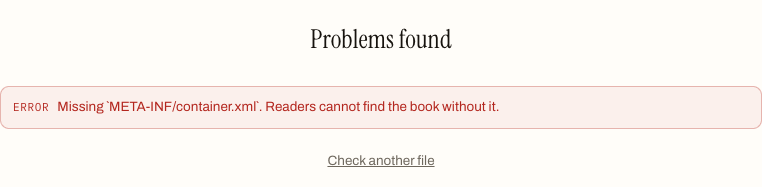
That first error is fatal on its own: the container file is the fixed, spec-mandated address every reader checks first, and without it the book simply does not open. The sections below go through the failures in the order a reader app hits them.
1. A broken or missing mimetype
Every EPUB must contain a file called mimetype, holding exactly application/epub+zip, stored uncompressed as the first entry in the archive. This is the strictest rule in the format.
It breaks when someone unzips a book, edits something, and re-zips it with a normal archiver — which compresses everything, including the mimetype. The contents look fine and the file is unopenable.
Fix: rebuild the archive with a tool that understands EPUB. Any of our converters will do it as a side effect of a round trip.
2. Files listed but missing
The package document contains a manifest — a list of every file in the book. If it names chapter-07.xhtml and that file is not in the archive, readers fail at the point they need it, which is often mid-book rather than at open.
This is the single most common real error, and it is usually the result of hand-editing.
Fix: the Validator names each missing file. Either restore the file or delete its manifest entry.
3. Missing required metadata
EPUB requires three things: dc:title, dc:language, and dc:identifier. Miss any one and strict readers refuse the file, while lenient ones open it and show it as “Unknown”.
Fix: the Metadata Editor writes all three without re-encoding the rest of the book.
4. Malformed XHTML
EPUB chapters are XHTML, not HTML, and XML is unforgiving. An unclosed <p>, a bare & that should be &, an <img> without a self-closing slash — any one of these stops the parse dead.
Browsers forgive all of this. E-readers do not. That is why a chapter can look perfect in Chrome and break a Kindle.
Fix: find the offending file and close the tags. If you are not editing by hand, converting the book to EPUB again will re-serialise it cleanly.
5. No navigation document
An EPUB 3 needs a nav.xhtml with properties="nav" in the manifest. Without it the book usually opens, but the table of contents is empty and some stores reject it outright.
Fix: include a nav document. Every book our converters produce has one, plus an NCX for older readers.
The nuclear option
If none of it resolves, run the book through a conversion and back. It is rebuilt from scratch, which discards whatever was malformed — at the cost of any custom CSS. Not elegant, but it works.
Reading the file yourself
Everything above is diagnosable by hand, because an EPUB is just a ZIP. Copy the file, rename the copy to .zip, and unzip it. You now have the whole book as text files you can open in any editor.
This is worth doing once even if you never need to. Seeing that content.opf is a plain list of files, and that chapters are ordinary XHTML, turns “corrupt file” from a mystery into a specific thing you can go and look at.
What you should find:
mimetype
META-INF/container.xml
OEBPS/content.opf
OEBPS/nav.xhtml
OEBPS/chapter-001.xhtml
...
If mimetype is missing, or container.xml points at a file that is not there, you have already found your problem.
The re-zip trap
The single most common way people create a broken EPUB is by fixing one: unzip, edit a chapter, select all, compress.
That produces an archive where mimetype is compressed and not first — both of which the spec forbids. The contents are perfect and the file will not open anywhere.
If you must repackage by hand, the mimetype entry has to be added first and stored uncompressed. It is far easier to let a tool rebuild the archive: running the book through any of our converters produces a correctly-structured file as a side effect.
Errors versus warnings
Not everything the Validator reports is fatal, and knowing the difference saves effort.
Errors break the file. A missing mimetype, a broken container, absent required metadata, manifest entries pointing at nothing. Fix all of them.
Warnings are things that work but will bite you. No navigation document means an empty table of contents and rejection from some stores. An EPUB 2 package opens fine but is a decade behind. Fix them before publishing; ignore them for personal reading.
When a store rejects a file that validates
This happens, and it is not a contradiction. Stores enforce their own rules on top of the specification:
- Cover image dimensions and aspect ratio
- Metadata completeness — some require a description, a publisher, a language code in a specific form
- Total file size limits
- No external links in certain regions
- Fonts must be licensed for embedding
A structurally valid EPUB is a necessary condition, not a sufficient one. If our validator passes and the store still refuses, their guidelines are the next thing to read.
The pragmatic repair
If you cannot find the fault and the book is not precious, convert it and convert it back. Run the EPUB through EPUB to TXT or EPUB to DOCX, then back to EPUB. The book is rebuilt from its content, discarding whatever was malformed.
You lose the original styling and often the images, so this is a last resort rather than a first move. But for a file that will not open at all, a plain readable book beats a broken beautiful one.
Frequently asked questions
Is "this file is corrupt" ever literally true for an EPUB?
Almost never. The message means the reading app hit something it could not parse and gave up without saying what — nearly always one of five structural problems: a compressed or missing mimetype, manifest entries pointing at files that are not there, absent required metadata, malformed XHTML or a missing navigation document. A validator names the specific one in seconds.
Why does my ebook break halfway through instead of refusing to open?
Because readers load files as they need them. A manifest that names chapter-07.xhtml when no such file is in the archive fails at the point a reader reaches it — often mid-book rather than at open. Files listed but missing is the single most common real error, and it is usually the result of hand-editing.
Why does a chapter look fine in a browser but break on an e-reader?
EPUB chapters are XHTML, not HTML, and XML parsing is unforgiving. Browsers silently repair an unclosed paragraph tag or a bare ampersand; an e-reader's parser stops dead at the first one. That is how the same chapter renders perfectly in Chrome and breaks a Kindle. Converting the book to EPUB again re-serialises the markup cleanly.
Why did my EPUB stop opening after I edited it?
Most likely the re-zip. Unzipping a book, editing a chapter and compressing the folder again produces an archive where the mimetype entry is compressed and not first — both forbidden by the spec — so the contents are perfect and the file opens nowhere. Rebuild the archive with a tool that understands EPUB instead of a general archiver.
Can a rejected EPUB be repaired without losing the book?
Usually. Most fixes are surgical: restore or delist a missing file, add the three required metadata fields, close the malformed tags. The last resort — converting to another format and back — rebuilds the book from its content, which discards whatever was broken but also loses custom CSS and often the images. The text itself survives.