How to reduce EPUB file size without wrecking the images

A full-length novel is about 500 KB. If your book is 200 MB, the text is a rounding error and the images are the entire file.
A real before-and-after
We ran an image-heavy test book through the compressor: a two-page comic EPUB weighing 99,804 bytes went in, 56,026 bytes came out — 43.9% smaller, with both pages intact:
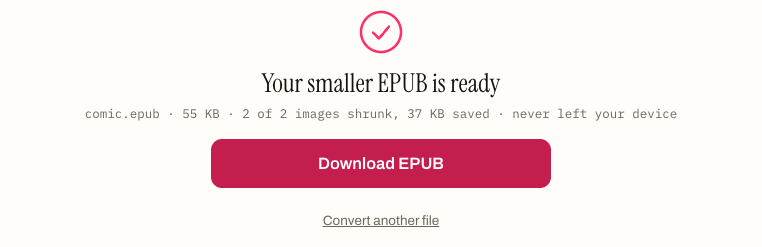
Nearly all of that saving came from the images, which is the pattern for almost every oversized EPUB — and the reason the rest of this post is mostly about pictures, not prose.
Where the size actually is
Unzip an oversized EPUB and the picture is always the same: a handful of enormous images, usually exported at print resolution because that is what the design file contained. A 4000×6000 photograph at print quality is several megabytes. Twenty of them is your whole problem.
The text — every word you wrote — is typically under 1% of the file.
What resolution you actually need
Screens are not paper. A Kindle Paperwhite is 1236×1648. A large tablet is around 2048×2732. Anything beyond roughly 2000 pixels on the long edge is data no reader will ever display.
| Level | Longest edge | Quality | Good for |
|---|---|---|---|
| Light | 2000px | 85% | Photography and art books |
| Balanced | 1400px | 70% | Almost everything |
| Maximum | 1000px | 50% | Email limits, e-ink-only reading |
Balanced is the right answer for nearly every book. On an e-ink screen — greyscale, moderate resolution — even Maximum is difficult to tell from the original.
Why the file limit matters
Send-to-Kindle caps attachments at 50 MB. Most email providers stop at 25 MB. And Amazon charges authors a delivery fee based on the delivered file size, so an uncompressed image-heavy book costs you money on every single sale — often more than the compression takes to run.
If it is still too big
Some books are legitimately large: photography collections, art monographs, technical manuals with hundreds of diagrams. When compression is not enough, split the book into volumes. Each part is a complete, valid EPUB with its own navigation, and readers can take them one at a time.
Look before you compress
Rename a copy to .zip, unzip it, and sort the contents by size. Ninety-nine times out of a hundred the answer is immediate: a handful of enormous images, and everything else is rounding error.
This is worth thirty seconds because it tells you whether compression will help at all. If the biggest file in the book is 40 KB, your book is not image-heavy and the Compressor has nothing to work on — something else is going on, usually an embedded font set or a stray video.
Why print resolution ends up in ebooks
Nobody chooses to ship a 4000-pixel photograph to a Kindle. It happens because the image came from a design file, a print workflow, or a phone camera, and no step in between resized it. Export tools default to preserving what they were given.
The result is a book carrying maybe fifteen times more pixel data than any screen will display.
What “quality 70” actually means
JPEG quality is not a percentage of anything visible. It selects how aggressively the encoder discards high-frequency detail — fine texture, sharp edges, subtle gradients.
At 85 the losses are essentially invisible on any screen. At 70 you can find them by pixel-peeping a photograph but not by reading. At 50 you will see softness in detailed images and possible banding in smooth gradients, and on a greyscale e-ink screen you will still struggle to tell.
This is why Balanced is the default. Photographs and paintings are forgiving. The images that suffer first are ones with hard edges and flat colour — diagrams, screenshots, line art, anything with text in it. If your book is mostly diagrams, use Light.
What is deliberately left alone
The Compressor only re-encodes raster images, and only when the result is actually smaller. Specifically untouched:
- All text, markup and metadata — byte-for-byte identical
- SVG, which is vector and already tiny
- Any image where re-encoding would not help
That last one matters. Running the tool on an already-optimised book reports “already optimal” and changes nothing, rather than degrading images for no gain.
Why size costs money
For anyone self-publishing, this is not just tidiness. Amazon charges a delivery fee per megabyte on every KDP sale in the 70% royalty band. A 50 MB book that could have been 8 MB costs you that difference on every copy sold, forever.
Compression takes under a minute. The arithmetic is not close.
When compression is not the answer
Some books are legitimately large — photography collections, art monographs, technical manuals with hundreds of figures. Once you are at sensible resolution and quality, the data is the book.
At that point split it into volumes. Each part is a complete, valid EPUB with its own metadata and navigation, small enough to email and to sync. Readers take them one at a time, which for a reference work is often better anyway.
And if the file is huge because of embedded fonts rather than images, drop the embedding. Four weights of a family can add a couple of hundred kilobytes for a benefit most readers will override.
How to shrink an oversized EPUB
- 01 Look before you compressRename a copy to .zip, unzip it and sort the contents by size. If the biggest file in the book is 40 KB it is not image-heavy and compression has nothing to work on — usually an embedded font set or a stray video is the cause.
- 02 Pick a levelBalanced — 1400px at quality 70 — is the right answer for nearly every book. Light (2000px, 85%) suits photography and art; Maximum (1000px, 50%) is for fighting an email limit or reading on e-ink only.
- 03 Run the CompressorOnly raster images are re-encoded, and only where the result is actually smaller. Text, markup and metadata come out byte-for-byte identical.
- 04 Split it if it is still too bigSome books are legitimately large. Split the book into volumes — each part is a complete, valid EPUB with its own metadata and navigation, small enough to email and to sync.
Frequently asked questions
Why is my EPUB so large?
Almost always a handful of enormous images exported at print resolution. A full-length novel is about 500 KB, and the text of any book is typically under 1% of the file. Unzip a copy and sort the contents by size — the answer is usually immediate.
How much smaller does compression actually make a book?
It depends on how oversized the images were. A two-page comic EPUB run through the Compressor went in at 99,804 bytes and came out at 56,026 — 43.9% smaller, with both pages intact. Nearly all of that saving came from the images, which is the pattern for almost every oversized EPUB.
Does compressing an EPUB damage the text?
No. Only raster images are re-encoded, and only when the result is smaller. Text, markup and metadata come out byte-for-byte identical, SVG is left alone because it is vector and already tiny, and an already-optimised book reports "already optimal" rather than being degraded for no gain.
What image resolution does an ebook actually need?
Roughly 2000 pixels on the long edge at most. A Kindle Paperwhite is 1236×1648 and a large tablet around 2048×2732, so anything beyond that is data no reader will ever display.
What does JPEG quality 70 mean in practice?
It sets how aggressively the encoder discards high-frequency detail — fine texture, sharp edges, subtle gradients. At 85 the losses are essentially invisible on any screen; at 70 you can find them by pixel-peeping a photograph but not by reading; at 50 detailed images soften and smooth gradients can band. Hard-edged content suffers first, so use Light for a book that is mostly diagrams, screenshots or line art.
What if the book is still too big after compressing?
Split it into volumes. Each part is a complete, valid EPUB with its own metadata and navigation, small enough to email and to sync — which for a reference work is often better anyway. If the bulk is embedded fonts rather than images, drop the embedding: four weights of a family can add a couple of hundred kilobytes for a benefit most readers override.
Why does file size cost self-publishers money?
Amazon charges authors a delivery fee based on delivered file size in the 70% royalty band, so an uncompressed image-heavy book costs that difference on every copy sold. Send-to-Kindle also caps attachments at 50 MB, and most email providers stop at 25 MB.