Tables in EPUB: why they break and what survives

Paste a spreadsheet into a manuscript, convert it, and the result looks right until it meets a phone. Tables in EPUB are where the format’s one great promise — text that reflows to any screen — runs into the one block element that refuses to cooperate. The complaint recurs for years at a stretch on MobileRead and in Adobe’s InDesign community: columns sheared off, borders vanished, a grid that was crisp in the desktop preview arriving as soup on the reader. None of that is random. It follows from what a table is, and it is measurable.
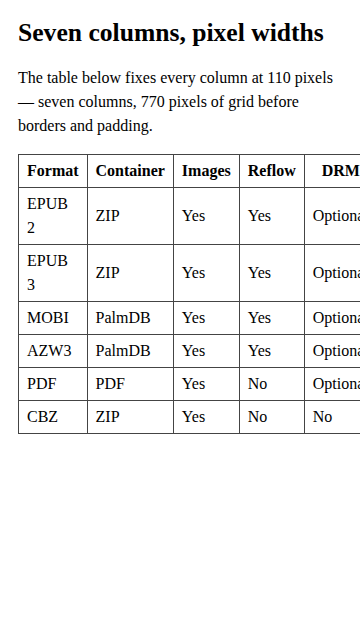
So we measured it. We hand-built a three-chapter test book — one chapter of plain prose, one seven-column table with pixel-sized columns, one three-column table sized in percentages — and rendered it at a 360-pixel phone viewport, which is the narrow end of where ebooks actually get read.
Why tables in EPUB break: a grid cannot reflow
A paragraph reflows because every space between words is an offer: break here if you need to. A reading app takes those offers wherever the screen runs out, which is why the prose chapter of our test book fits any width without losing a character.
A table withdraws the offer. Its promise is two-dimensional — everything in this column aligns, everything in this row belongs together — and keeping that promise puts a hard floor under its width. A column can shrink until its widest unbreakable word just fits, and no further. The floor for the whole table is those minima added up, plus borders and padding. No font setting, margin setting, or orientation change repeals it; a bigger reading font raises the floor.
The numbers from the test book make the floor concrete. The seven-column chapter asked for 110-pixel columns — 770 pixels of grid. Chromium’s table layout compressed the columns below what the stylesheet requested, down to the width of words like “Container” and “Optional”, and stopped at 493 pixels: the table’s minimum-content width. On the 360-pixel screen that left 133 pixels — the “Year” data and the entire “Extension” column — outside the viewport, with the “DRM” column clipped mid-word.
The three-column chapter tells the other half of the story. Sized in percentages, with short labels, it rendered 324 pixels wide at the same viewport — inside the screen with margin to spare, nothing hidden. Same format, same reader, same screen. The difference was the shape of the table, not the technology.
Kobo’s publisher guidelines say this plainly: “Sometimes tables wider than four columns may not be readable in reflowable EPUB files, particularly on eInk devices,” advising producers to test anything wider on every platform — and, when a table will not render, to reformat it or capture it as a high-resolution image (kobolabs/epub-spec, Tables, as of October 2026). Four columns is not a magic number; it is where the minimum-width arithmetic usually starts losing to small screens.
What conversion keeps, and what it quietly drops
The other recurring table complaint is not geometry but decoration: the grid arrives, the lines are gone. To see exactly what a conversion carries we built a Word file around the same seven-column table — 1,718 bytes, with single-line borders declared on every cell, the way Word writes them — and dropped it on our live DOCX converter.

The 2,869-byte EPUB that came out is honest about structure. Opening its
single chapter shows the table fully intact — <table><tbody><tr><td>,
all seven columns, every cell’s text wrapped in its own paragraph, the
closing paragraph after the table in its right place. Nothing tabular was
flattened.
The decoration is another matter. The borders Word declared on every cell are nowhere in the output: the chapter carries no border markup, and the stylesheet the converter ships has rules for body text, headings, paragraphs, blockquotes and images — and none for tables. Rendered anywhere, this grid is borderless. The top row also arrives as ordinary cells: nothing in the output distinguishes it as a header. That is our own tool’s behaviour, reported as found; the general lesson travels, because styling tables is exactly the part of conversion different tools improvise differently. Word’s table look is paint on top of the data, and converting a manuscript moves the data.
Export dissolves the grid in the other direction
Going out of EPUB, the failure mode flips. Our PDF converter re-typesets a book as flowing text — that is what makes its output selectable and searchable — and its block extractor recognises headings, paragraphs, blockquotes, lists and images. A table is none of those, so the extractor walks into it and surfaces what it finds: each cell’s text, one block at a time.
We ran the test book through the live converter to see that path end to end. The 3,180-byte EPUB became a 5,605-byte, four-page PDF, and decompressing its content streams shows all 49 cells of the seven-column table present and in reading order — drawn as a single stack, one cell per line: “Format”, “Container”, “Images”, each row’s cells following one under another. No text was lost; the grid dissolved entirely. The same extractor feeds our text and Word exports, so the trade is consistent across all three: cells become paragraphs.
For completeness we also handed the clipped seven-column book to the validator, which reported “No problems found. This EPUB is structurally valid.” It is right: validation checks the container and the markup, and an unreadable-but-well-formed table is not a structural fault. If the page itself is being clipped rather than one table — whole lines of prose losing their endings — that is a different, stylesheet-level fault with its own repair.
Designing a table that survives
The floor arithmetic cannot be beaten, but it can be designed for.
| The shape | On a 360 px screen |
|---|---|
| 7 columns, wordy cells | 493 px minimum — clipped, one column invisible |
| 3 columns, percentage widths | 324 px — fits with margin |
| The same data as a list | Reflows like prose, nothing to clip |
Cut columns before you shrink them. Widths in percentages let a table flex — our three-column chapter proves it — but no width setting pushes a column below its longest word. Merging “Year” into the format name, or dropping a column readers can infer, lowers the floor in a way styling cannot.
Turn narrow tables into lists. A two-column table of terms and definitions is a definition list wearing a costume. Set as labelled paragraphs, it reflows like everything else and survives every converter we just tested, because paragraphs are the one thing every path preserves.
Split wide tables by rows, not columns. Two four-column tables under their own subheadings beat one eight-column table on every narrow screen, and cost nothing on wide ones.
Reserve the image fallback for layouts that are the content. Kobo’s suggestion to capture a stubborn table as a high-resolution image trades away reflow, search, selection and text-to-speech, so it belongs where the visual arrangement itself is the point — and it wants a prose summary or serious alt text alongside. A book that is mostly such layouts is drifting toward fixed-layout territory, which is its own set of compromises.
The through-line is the one the measurements kept returning: a table’s survival is decided when it is shaped, not when it is rendered. Shape it for the narrowest screen you expect, then run the manuscript through the DOCX to EPUB converter and look at the result at phone width — the conversion is in the browser, the file never leaves your machine, and a table that holds up there has already passed the hardest test most readers will set it.
Frequently asked questions
Why does my EPUB table look fine on my computer but broken on my phone?
Because the desktop window was wider than the table's minimum width and the phone is not. A table can shrink only until every column is as narrow as its longest unbreakable word; past that point the surplus simply leaves the screen. Our seven-column test grid bottomed out at 493 pixels, so a 360-pixel screen lost 133 pixels of it — including an entire column.
How many columns can a table safely have in an ebook?
Kobo's own EPUB guidelines warn that tables wider than four columns may not be readable in reflowable books, particularly on eInk devices, and that advice generalises. The real limit is not the count but the sum of each column's longest word: seven short columns can fail a phone screen while three generous ones fit with room to spare.
Why did my table lose its borders when I converted from Word?
Conversion carried the table's structure, not its decoration. In our test the Word file declared single-line borders on every cell, and the converted chapter kept the full row-and-cell markup but shipped a stylesheet with no table rules at all — so any reading app draws the grid borderless. The data is intact; the ruling that made it legible is gone.
Should I replace a wide table with an image of the table?
As a last resort, and with open eyes. Kobo's guidelines themselves suggest capturing a table that will not render as a high-resolution image, and an image does freeze the layout you designed. The costs are real: the text inside it cannot resize, reflow, be searched, or be read aloud, so it needs a genuine alternative in the body or in alt text.
Do tables survive converting an EPUB to PDF?
The text does; the grid may not. Our converter re-typesets a book as paragraphs, so every one of the 49 cells in the test table arrived in the PDF — stacked in a single column, one cell per line, reading order preserved but the rows dissolved. Converters that rasterise pages keep the grid instead and give up selectable text. Check which trade your tool makes before shipping the output.
Is a table that gets cut off a validation error?
No. The clipped seven-column book in our test passed a structural validation with no problems found, because validation checks the container, the manifest, and the markup's well-formedness — not whether the content fits any particular screen. A table can be perfectly valid and unreadable at the same time; readability has to be designed, not validated.