EPUB 2 vs EPUB 3: what actually changed

Every EPUB carries a version number, and almost nobody looks at it. The gap between EPUB 2 and EPUB 3 sounds like it should be enormous — a whole generation of the format — but inside the archive it comes down to one attribute, one navigation file, and a stricter set of rules about metadata. To pin down the difference precisely, we took our five-chapter test book and packaged it both ways, then compared the results byte by byte.
Both files open. Both validate. One of them just does it with a warning.
One book, packaged both ways
Our specimen book is a five-chapter EPUB produced by this site’s own converters. It is a normal EPUB 3 file: the package document declares version="3.0", and the archive carries two tables of contents — nav.xhtml for current readers and toc.ncx for old ones.
$ unzip -l specimen.epub   (5,183 bytes total)
       251  META-INF/container.xml
       364  OEBPS/chapter-001.xhtml
       845  OEBPS/chapter-002.xhtml
       905  OEBPS/chapter-003.xhtml
       618  OEBPS/chapter-004.xhtml
       573  OEBPS/chapter-005.xhtml
      1314  OEBPS/content.opf
       682  OEBPS/nav.xhtml
       452  OEBPS/style.css
       986  OEBPS/toc.ncx
        20  mimetype
Then we rebuilt the package exactly the way an EPUB 2-era pipeline would have shipped it. Same chapters, same stylesheet, same mimetype, same container.xml — but the package document now says version="2.0", the nav.xhtml file is gone (it did not exist in EPUB 2), navigation is the NCX alone, and the EPUB 3-only dcterms:modified timestamp is dropped:
$ unzip -l specimen-epub2.epub   (4,675 bytes total)
       251  META-INF/container.xml
       364  OEBPS/chapter-001.xhtml
       845  OEBPS/chapter-002.xhtml
       905  OEBPS/chapter-003.xhtml
       618  OEBPS/chapter-004.xhtml
       573  OEBPS/chapter-005.xhtml
      1199  OEBPS/content.opf
       452  OEBPS/style.css
       986  OEBPS/toc.ncx
        20  mimetype
That is the entire difference: 508 bytes, most of it the missing navigation document. The book’s text did not change at all.
Where the versions genuinely differ
| EPUB 2 | EPUB 3 | |
|---|---|---|
| Package declaration | version="2.0" | version="3.0" |
| Table of contents | toc.ncx (XML navMap) | nav.xhtml (real HTML list) |
| Chapter markup | Older XHTML | HTML5-style XHTML |
| Required metadata | Title, identifier, language | The same, plus dcterms:modified |
| Cover marking | <meta name="cover"> in metadata | properties="cover-image" on the manifest item |
| Audio, video, SVG, scripting | Not part of the format | Supported, where the reader implements it |
| Fixed layout | Not standardised | Standardised |
The deepest change is navigation. EPUB 2 described the table of contents in a DAISY-derived XML dialect — navPoint, navLabel, playOrder — that only ereading software could render:
<navMap>
  <navPoint id="np1" playOrder="1">
    <navLabel><text>THE CONVERSION SPECIMEN</text></navLabel>
    <content src="chapter-001.xhtml"/>
  </navPoint>
  …
EPUB 3 replaced that with something almost embarrassingly simple — an ordinary HTML page containing an ordinary list:
<nav epub:type="toc" id="toc">
  <h1>Contents</h1>
  <ol>
    <li><a href="chapter-001.xhtml">THE CONVERSION SPECIMEN</a></li>
    …
Both snippets above are quoted from the same real book, and they encode identical information. The HTML version can be styled, displayed as a page, and read by anything that understands the web. The NCX can’t. That is the flavour of the whole revision: EPUB 3 swapped the format’s private dialects for the web’s ordinary ones. It is also why well-built EPUB 3 files ship both — the couple of kilobytes the NCX costs buys a working table of contents on readers that predate the change. A full tour of these files lives in our guide to what is inside an EPUB.
The rich-media row deserves one honest caveat: EPUB 3 makes audio, video and scripting possible, and reader support for them is genuinely uneven. A feature being in the specification has never forced an app to implement it — which is a large part of why the same book can behave differently across apps, as our post on EPUB compatibility problems shows.
Both versions validate — one with a warning
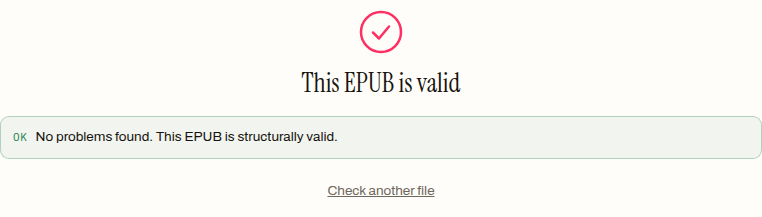
We dropped each file onto our validator. The EPUB 3 original passes clean:
The EPUB 2 rebuild also passes — with a warning instead of a clean bill:
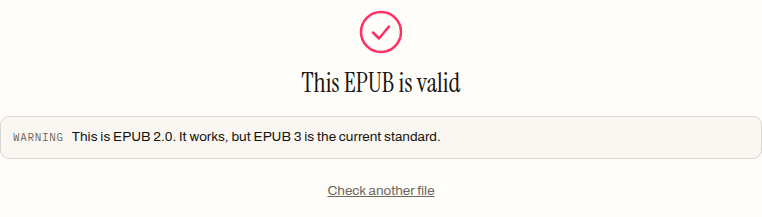
That warning-not-error distinction is the correct reading of the situation, and it is how strict tools see it too: epubcheck keeps a whole NCX category for legacy navigation and treats an EPUB 2 package as something to flag, not something to refuse. Errors mean readers may reject the file; warnings mean it works but carries a cost — and where the file is headed decides how much that cost matters. Our breakdown of EPUB validation errors covers that split in detail.
How to tell which version a book is
The version lives in one place: the version attribute on the <package> element of the OPF file. You can see it by renaming the .epub to .zip, extracting it, and opening the .opf file in a text editor — or you can skip the archaeology and drop the book on a validator, which names the version for you in exactly the warning shown above.
A useful shortcut: if the archive contains a nav.xhtml (or any file whose manifest entry says properties="nav"), it is EPUB 3. If the only navigation is a toc.ncx, it is almost certainly EPUB 2.
Does an EPUB 2 book need upgrading?
Usually not. An EPUB 2 novel that opens, navigates and reads correctly is not broken — the fallback machinery that reads it is the same machinery the NCX in every well-built EPUB 3 exists to serve. The pressure to move to EPUB 3 is real but specific: store and library ingestion systems that reject on warnings, accessibility requirements, or a feature you actually need — embedded media, proper fixed layout, maths markup.
Being upfront about our own tooling: this site does not have an “EPUB 2 to EPUB 3” upgrade tool. Everything our converters produce is EPUB 3 with the NCX fallback included, so a book built here is current by construction — but upgrading an existing EPUB 2 file in place is a job for Calibre’s EPUB-to-EPUB conversion or a hand edit in Sigil, and for a complex book the hand edit is the safer of the two.
What you can do here, in the browser, is find out where you stand. Drop the book on the EPUB validator and it will tell you the version, whether the structure holds together, and whether anything in the package would actually stop a reader — which, far more often than the version number, is the thing that matters.
Frequently asked questions
Will an EPUB 2 book still open on modern readers and apps?
Yes, almost everywhere — the machinery that reads EPUB 2 never went away. Strict tools treat an old package as something to flag rather than refuse: the specimen rebuilt as EPUB 2 for this post validated with a warning, not an error. The pressure to upgrade comes from store ingestion systems, accessibility requirements and rich-media features, not from books failing to open.
Why do EPUB 3 files contain both a nav.xhtml and a toc.ncx?
The nav.xhtml is EPUB 3's table of contents — an ordinary HTML list. The toc.ncx is the legacy EPUB 2 navigation file, and well-built EPUB 3 books keep shipping it because the couple of kilobytes it costs buys a working table of contents on readers that predate the change. Identical information, encoded twice for two generations of software.
Can I convert an EPUB 2 file to EPUB 3 on this site?
Not in place — there is no EPUB 2 to EPUB 3 upgrade tool here. Everything this site's converters produce is already EPUB 3 with the NCX fallback included, so a book built here is current by construction. Upgrading an existing EPUB 2 file is a job for Calibre's EPUB-to-EPUB conversion or a hand edit in Sigil, and for a complex book the hand edit is the safer of the two.
Does EPUB 3 support audio and video?
The specification does — audio, video, SVG and scripting all became possible in EPUB 3, none of which were part of EPUB 2. But a feature being in the specification has never forced an app to implement it, and reader support for rich media is genuinely uneven. That gap is a large part of why the same book can behave differently from one app to the next.
Is an EPUB 3 file much bigger than the same book in EPUB 2?
No. Packaged both ways, the five-chapter specimen came to 5,183 bytes as EPUB 3 and 4,675 as EPUB 2 — a difference of 508 bytes, most of it the extra navigation document. The text did not change at all. The version lives in the package declaration, the navigation files and the metadata rules, not in the size or content of the chapters.