EPUB footnotes: why they pop up in some apps, not others

Somewhere on your shelf there is a book whose footnotes pop up in a neat little box on one device and, on another, throw you to the back of the book with no way home. The complaint has been circulating on MobileRead for over a decade, and it surfaces in Adobe’s InDesign forum every time an export that worked on an iPad does nothing on the next device someone tries. EPUB footnotes look broken in a way that invites file-blaming — and the file is almost never the thing that changed.
The file only contains links and asides
Open any EPUB — it is a zip of XHTML, as the structure of an
EPUB makes visible — and a footnote turns
out to be two ordinary pieces of markup. The reference in the running text
is a link, usually wrapped around a superscript number. The note itself is
a block of text, either an <aside> sitting near the passage it annotates
or a paragraph in a notes file at the back.
What upgrades this plumbing into something a reader can be clever with is
the epub:type attribute. The W3C’s structural semantics
vocabulary
defines noteref as “a reference to a note, typically appearing as a
superscripted number or symbol in the main body of text”, and footnote
as “ancillary information, such as a citation or commentary, that provides
additional context to a referenced passage of text”. Two labels, nothing
more. They change how the book renders in exactly zero engines that
ignore them — which is the point. The vocabulary has been pruned over the
years, too: endnote is now deprecated, and the older generic note was
replaced by footnote. The distinction readers care about — pops up here
versus lives at the back — was never really about the label.
Two wirings, one real file
To make the difference concrete rather than theoretical, we built a small EPUB 3 with both wirings side by side and ran it through our own tools. The whole book is 3,116 bytes:
$ unzip -l footnotes.epub   (3,116 bytes total)
       241  META-INF/container.xml
      1163  OEBPS/chapter-001.xhtml
       659  OEBPS/chapter-002.xhtml
       886  OEBPS/content.opf
       410  OEBPS/nav.xhtml
       426  OEBPS/notes.xhtml
        20  mimetype
Chapter one is the marked way. Each reference is a noteref, each note is
a footnote aside in the same file, and each note links back:
<p>…expounding a recondite matter to us.<a epub:type="noteref"
  role="doc-noteref" href="#fn1" id="ref1"><sup>1</sup></a> …</p>

<aside epub:type="footnote" role="doc-footnote" id="fn1">
<p>1. The narrator never gives the Time Traveller a name anywhere
in the novel. <a href="#ref1" role="doc-backlink">↩</a></p>
</aside>
Chapter two is the bare way you will find in most conversions and a lot of
older books: a plain <a href="notes.xhtml#n1"> superscript pointing at a
paragraph in a shared notes file. No semantics, no backlink.
Here is chapter one in a browser engine with no footnote support of its own — which is also roughly what a basic EPUB app shows:
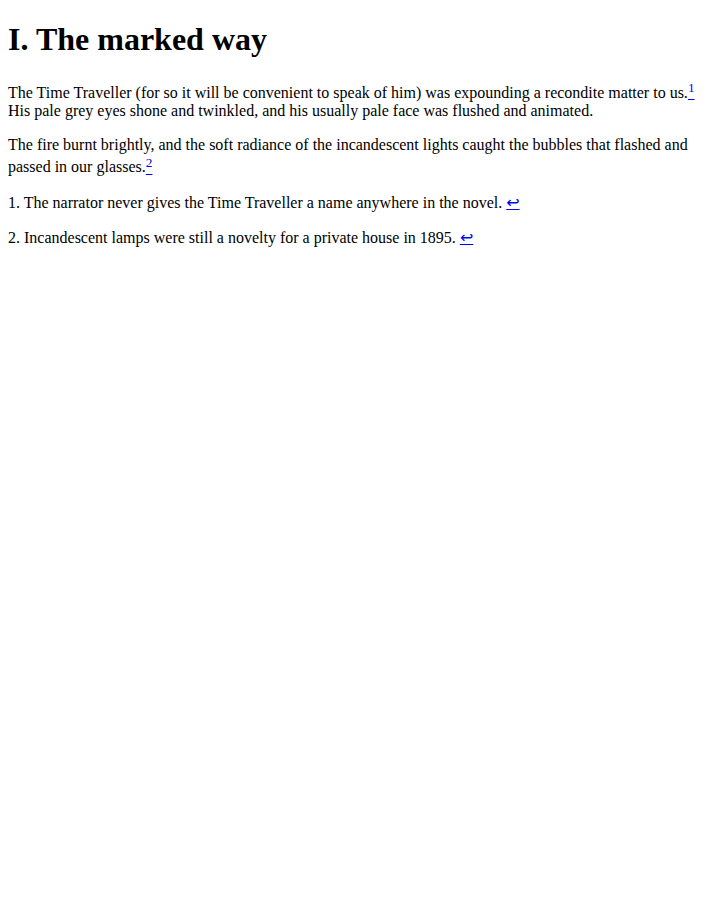
That screenshot is the honest baseline. The asides are not hidden, because
nothing in the file hides them — no CSS, no hidden attribute, nothing.
A book whose notes “appear in the middle of the chapter” is not damaged;
it is being read by an engine that renders what is there.
What a pop-up-capable reader does with each wiring
A reading system that supports the semantics does two extra things: it
conceals footnote asides from the normal flow, and it intercepts taps on
a noteref to show the target in a box instead of navigating. Kobo is the
one major vendor that documents this in public, in its EPUB spec on
GitHub: “Footnotes and endnotes on
the eInk (except for the original Kobo reader and the Kobo Wi-Fi) and iOS
platforms will display as a pop-up box containing the content being linked
to.” The same document says it is “strongly recommended that reference
notes use the appropriate epub:type identifying attribute”.
Note the shape of that promise: strongly recommended, on these platforms. The attribute is a request, and the reader decides. Kobo even documents heuristics that promote a bare link to a pop-up when it looks enough like a note — target after the reference, short linked content — so chapter two’s unmarked notes may pop up on some Kobo devices anyway, and not on others. That asymmetry, one file behaving three ways on hardware from a single vendor, is most of what the decade of forum threads is describing. We can’t test device rendering from a browser session, so we won’t tell you what your particular Kindle or iPad will do — the point is that nobody can tell you from the file alone.
Marking up notes so they can pop up
Retrofitting the marked wiring onto a finished book is mechanical, and the note text never moves. In order:
- Wrap each note in a marked aside.
<aside epub:type="footnote" role="doc-footnote" id="fn1">…</aside>, in the same XHTML file as the passage it annotates. Theroleduplicates the semantics in ARIA vocabulary, which is what assistive technology reads. - Mark the reference. The superscript becomes
<a epub:type="noteref" role="doc-noteref" href="#fn1">. - Add the backlink. Inside the note, a final
<a href="#ref1" role="doc-backlink">↩</a>— the escape route for every reader that jumps instead of popping up. - Validate the repacked file. Editing XHTML inside a zip is exactly where ids drift and manifests break.
Steps one to three are source-level edits, which makes this a job for a source editor — what Sigil is for — rather than for a metadata or cover tool. None of our tools rewrite note markup, so we route this honestly: the edit is yours to make, and the check afterwards is where we can help.
Conversion flattens the favour
Footnote complaints spike right after format conversions, and our own converters show why — this is behaviour we can demonstrate rather than speculate about. We ran the fixture through our EPUB to PDF converter, live in the browser, this session:
| Marked way (ch. 1) | Bare way (ch. 2) | |
|---|---|---|
| In the 4,801-byte PDF | Note text printed in the flow, straight after its paragraphs | Notes stay on the back page; markers become plain digits |
| Links in the PDF | None — zero link annotations in the output | None |
| In the 1,048-byte TXT | Notes inline after their paragraphs, backlink arrow and all | Notes at the end, markers glued to sentences (“…the Time Machine.1”) |
The 3,116-byte EPUB became a 4,801-byte, three-page PDF. We decompressed its content streams and counted the link annotations: zero. Both asides were rendered in place — the pop-up content is now baked into the page exactly where the browser screenshot above showed it. The text export does the equivalent: 1,048 bytes in which the marked notes sit inline with their little ↩ arrows and the bare notes wait at the back, their markers reduced to a digit fused onto the end of a sentence.
None of that is a converter bug. PDF fixes text onto pages; plain text has no links at all. A pop-up footnote is precisely the thing that cannot survive leaving the format, because it was never content — it was an agreement between markup and reader. Convert the book and the agreement lapses; the content, honestly, remains.
What validation can and cannot tell you
Both chapters of the fixture — the exemplary wiring and the bare one — went through our validator in the same session:
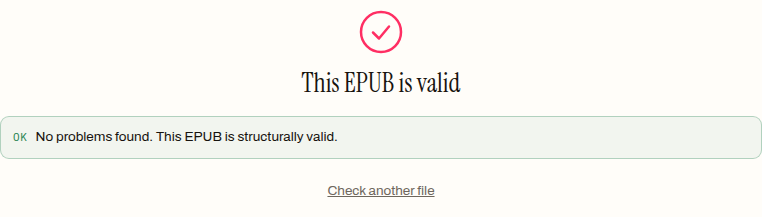
A pass was the only possible result, twice over. The semantics are
optional, so no validator anywhere fails a book for lacking them — a file
with no epub:type in it at all is a perfectly conforming EPUB. And our
validator checks the container level — mimetype, package document,
manifest against archive, spine, navigation — it does not parse chapter
XHTML, so it cannot see note markup even in principle. Validation answers
“is this book structurally sound?”, which is the question that matters
after you have edited the source; it has never answered “will my footnotes
pop up?”. No tool can answer that from the file, because the file only
carries the request.
So when the notes in a book stop popping up, read the event in this order: the app changed, the device changed, or a conversion stripped the semantics — and only then suspect the book. If you have been editing the markup yourself, the useful check is structural: drop the repacked file on our EPUB validator and let it confirm the ids, manifest and spine came through intact. The pop-up itself was never in your file — but whether your file deserves one now is.
How to mark up footnotes that can pop up
- 01 Wrap each note in an aside marked as a footnotePut the note text in an <aside> with epub:type="footnote" and role="doc-footnote", with its own id, in the same file as the passage it annotates.
- 02 Mark the in-text reference as a noterefMake the superscript number a link with epub:type="noteref" and role="doc-noteref" whose href points at the aside's id.
- 03 Add a backlink inside the noteEnd the note with a link back to the reference's own id, marked role="doc-backlink", so readers that jump instead of popping up have a way home.
- 04 Validate the repacked fileRun the book through an EPUB validator to catch broken ids and manifest slips from the edit. Expect a pass to confirm structure, not pop-up behaviour.
Frequently asked questions
Why did my footnotes stop popping up after I converted the book?
Because conversion rewrites the markup the pop-up depended on, or targets a format that has no pop-up concept at all. In a PDF the note text is fixed onto the page — in our test conversion the notes were baked in after their paragraphs and every internal link was dropped. The pop-up was never stored in the file; only the semantics that request it are, and they rarely survive a format change.
Do pop-up footnotes work in every EPUB app?
No. The pop-up is a reading-system feature, not a file feature. Kobo documents pop-up boxes on most of its eInk devices and on iOS, and recommends the epub:type attribute to trigger them. An engine without that feature simply renders the note text wherever it sits in the file and treats the marker as an ordinary link.
What is the difference between a footnote and an endnote in an EPUB?
Placement, mostly: a footnote's aside lives in the same file as its reference, while endnotes are collected in a separate section at the back. The current structural-semantics vocabulary has actually deprecated the endnote term and folds everything into footnote. Either way the reference is just a link, and a reader that supports pop-ups can show both kinds in place.
Can I add pop-up footnotes to a finished book without rewriting it?
Yes — it is a markup-only change. The note text stays exactly where it is; you wrap it in a marked aside and turn each reference into a noteref link. That does require source-level editing of the XHTML inside the EPUB, so it is a job for a source editor rather than a metadata tool.
Why does the note text show up twice, or in the middle of the chapter?
Because the note genuinely lives there in the file, and the app you are using does not hide footnote asides. Engines that support the semantics conceal the aside and show it only on tap; everything else renders the file as written. Seeing the note in place is the honest default, not corruption.