Sigil EPUB editor: what it is and when you actually need it

Ten posts on this blog end a hard case the same way: “a desktop editor like Calibre or Sigil”. Rewriting chapter text, hand-placing footnotes, repairing markup — again and again the answer routes away from our own tools and toward that pair of names. We have never once explained the second name. This post pays that debt: what the Sigil EPUB editor actually is, the class of edit it exists for, and — just as honestly — the edits where installing it is a detour.
What the Sigil EPUB editor actually is
Sigil is a free, open-source, multi-platform ebook editor — the project’s own words — built to edit books in EPUB format, both EPUB 2 and EPUB 3. It runs on Windows, macOS and Linux, is licensed under the GPLv3, and lives on GitHub, where the current release as of September 2026 is 2.8.1. It has been around long enough to have opinions baked in: a table-of-contents generator, metadata editing, book-wide reports, checkpoint comparisons so you can see what a session changed, spellchecking, EPUB, CSS and XHTML validation, and a Python 3 plugin system that the community has built on for years.
One thing Sigil is not, despite the word “ebook” in its description, is a converter. It opens an EPUB and saves an EPUB. If the book is a MOBI or the deliverable is a PDF, conversion is a separate step on either side of the editing.
The other thing it is not, any more, is a visual editor. Sigil once shipped a word-processor-like Book View; it was deprecated and removed, and its role moved into a separate companion app, PageEdit, maintained by the same team. Sigil proper shows you markup. That is not a limitation grudgingly tolerated — it is the design. Which raises the obvious question: why would anyone want to edit a book as markup?
Why chapter text is a different class of edit
An EPUB is a zip of small files with rules, and the edits people make to one split cleanly in two. Changing the author field, swapping the cover, adjusting line spacing — each of those rewrites one small, self-contained file inside the archive, and a tool can do it through a form because the change has a known shape. That is why those jobs work in a browser, and why our guide to editing an EPUB routes them there.
Chapter text is the other class. The chapters are XML documents, and XML is unforgiving in a way that word processors have trained everyone not to expect: every opened tag must close, in order, or the document is malformed — not slightly wrong, but formally invalid. A one-word rewording that clips a tag produces a chapter that strict reading engines refuse to render at all. There is no form a tool can offer for “change anything about this document”; at that point you are editing source, and the only question is whether your editor understands the source with you.
That is the gap Sigil occupies. It shows the markup with the structure visible, validates the XHTML as you work, spellchecks the prose, previews the result, and — the quiet half of the job — repacks the archive correctly on save, honouring the container rules that general-purpose zip tools break. Our post on fixing a typo in a published ebook covers what goes wrong when the repacking is done naively; an EPUB-aware editor makes that whole failure mode impossible.
The same job done by hand, so the sharp edges show
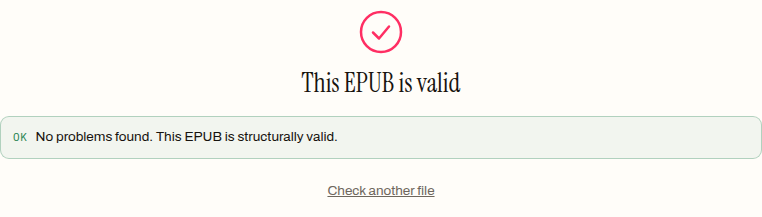
To make the risk concrete we did a Sigil-class edit the hard way — by hand, no editor — on the five-chapter, 5,183-byte specimen book this blog uses for every test. The edit could hardly be smaller: italicise one clause in chapter 2, which means wrapping it in an <em> tag at source level. Unpacked, edited (chapter file: 845 → 854 bytes), repacked with the container rules respected, the result is a 5,189-byte book that passes our validator cleanly:
Then we did it sloppily, on purpose: same edit, but the closing </em> left off — the exact slip a careless find-and-replace makes. Opened in Chromium, whose engine parses XHTML as strictly as an EPUB reading system does, the chapter dies mid-sentence:
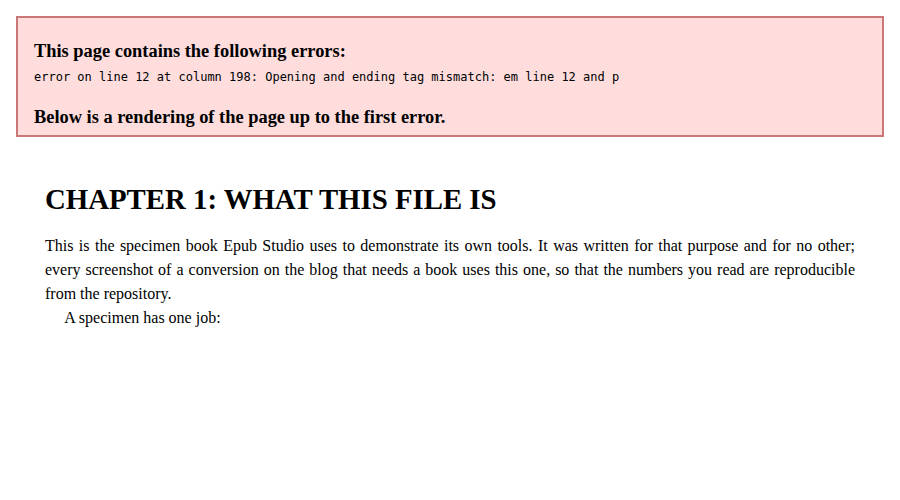
error on line 12 at column 198: Opening and ending tag mismatch: em line 12 and p — and the rendering stops at “A specimen has one job:”. One missing tag cost the reader the rest of the chapter.
Now the uncomfortable part, reported because we checked: our own validator passes the broken file. Same green report, “No problems found. This EPUB is structurally valid.” That is not a fluke — it is what the tool is scoped to do. It verifies the container: the mimetype, the manifest, the reading order, the navigation. It never opens the chapter files. A book can be structurally sound and textually broken at the same time, and a container-level check will wave it through while a strict reader chokes. Catching the malformed tag as you type it is precisely the job Sigil’s XHTML validation exists to do, and it is a job our browser tools do not attempt.
When Sigil is the wrong-sized tool
The honest counterweight, because a ten-post drumbeat of “use Sigil” can leave the impression it is the answer to everything. For the most common EPUB edits, it is overkill.
Metadata wrong on the shelf — author misspelled, title carrying a working name? That is one small file inside the archive, and the metadata editor rewrites it in the browser in under a minute, with nothing installed and the book never leaving your machine. Cover swaps and styling changes are the same structured story. And if the job is getting the book into EPUB in the first place, or out of it, that is converter territory — Sigil will not do it at any skill level.
There is also a cost side that deserves plain statement. Sigil is a desktop application you install and learn; its working surface is markup, which is exactly right for markup problems and unnecessary friction for everything else. The order of operations that has held across this whole blog holds here too: name the edit first, then pick the tool. Structured edit — browser, done. Source edit — install Sigil, make the change with the validation watching your back, and run the result past a validator on the way out, because the habit costs seconds and catches the failure modes that matter.
The debt from the cold open, then, is paid in one sentence: Sigil is what “edit the book itself” looks like when it is done properly — and the reason this blog names it so often is that sending a chapter-markup problem to a form-based tool, ours included, would be sending you to the wrong class of instrument.
Frequently asked questions
Is Sigil free, and what does it run on?
Yes. Sigil is free, open-source software under the GPLv3 licence, with installers for Windows, macOS and Linux. The current release as of September 2026 is 2.8.1, and it edits both EPUB 2 and EPUB 3 books.
Can Sigil convert an EPUB to PDF, MOBI or Word?
No — Sigil is an editor, not a converter. It opens an EPUB, lets you change what is inside, and saves an EPUB. Getting the book into another format is a separate job for a converter, before or after the editing.
Do I need to install Sigil just to fix metadata or a cover?
No. Metadata, cover and styling edits change small, self-contained files inside the archive, and browser tools make those changes without an install and without the book leaving your machine. Sigil earns its install when the edit touches the chapter markup itself — rewording text, fixing tags, restructuring navigation by hand.
Can I edit an EPUB in Sigil visually, like a word processor?
Not inside Sigil itself any more — its old visual Book View was deprecated and removed. The Sigil team maintains a separate companion app, PageEdit, which carries that visual XHTML editing role. Sigil proper is a source editor: you work on the markup with a preview alongside.
Why did the validator here pass a book with a broken chapter?
Because this site's validator deliberately checks the container — the mimetype, the manifest, the reading order — and never parses the chapter files themselves. A book can be structurally sound and still carry malformed markup that strict readers refuse to render. Catching that class of fault while you type is exactly what a source editor like Sigil is for.