Convert EPUB to HTML by renaming one file

Search for a way to convert EPUB to HTML and you get pages of converter sites, upload forms and desktop suites — all offering to produce something you already have. An EPUB is HTML. Not “based on” it, not “convertible to” it: the chapters inside the file are web documents, sitting next to a stylesheet, zipped up with a table of contents. The whole conversion is getting them out, and that takes a file manager, not a converter.
This post does it on a real book from this site’s own test set, so every filename and byte count below is reproducible — and then covers the part the converter sites skip: what the extracted files are like to actually use, and where the trick stops working.
.zip, extract it. The chapters are in the content folder as .xhtml files — web pages your browser opens directly, styling and all. No software to install, nothing uploaded anywhere.
Why there is no converter to find
An EPUB is a ZIP archive with rules. Here is the entire contents of our five-chapter test book, 5,183 bytes on disk:
       251  META-INF/container.xml
       364  OEBPS/chapter-001.xhtml
       845  OEBPS/chapter-002.xhtml
       905  OEBPS/chapter-003.xhtml
       618  OEBPS/chapter-004.xhtml
       573  OEBPS/chapter-005.xhtml
      1314  OEBPS/content.opf
       682  OEBPS/nav.xhtml
       452  OEBPS/style.css
       986  OEBPS/toc.ncx
        20  mimetype
Five chapters, one stylesheet, and a handful of bookkeeping files — the manifest, the navigation document, a legacy table of contents. The anatomy of each piece is a story of its own; what matters for this job is that every word of the book lives in those .xhtml files, and .xhtml is HTML serialised as strict XML. The “conversion” everyone is searching for is a rename and an unzip.
Rename, extract, open
- Copy the book, and rename the copy to
.zip. The original stays readable on your shelf; the copy is the one you take apart. The rename changes nothing inside the file — it just tells your file manager to treat it as the archive it already was. - Extract it. Windows, macOS and every Linux desktop unzip natively. You get a folder tree matching the listing above.
- Open the content folder. In our book that is
OEBPS/— the name varies by publisher, but it is wherever the.xhtmlfiles landed. - Open a chapter in your browser. Double-click one:
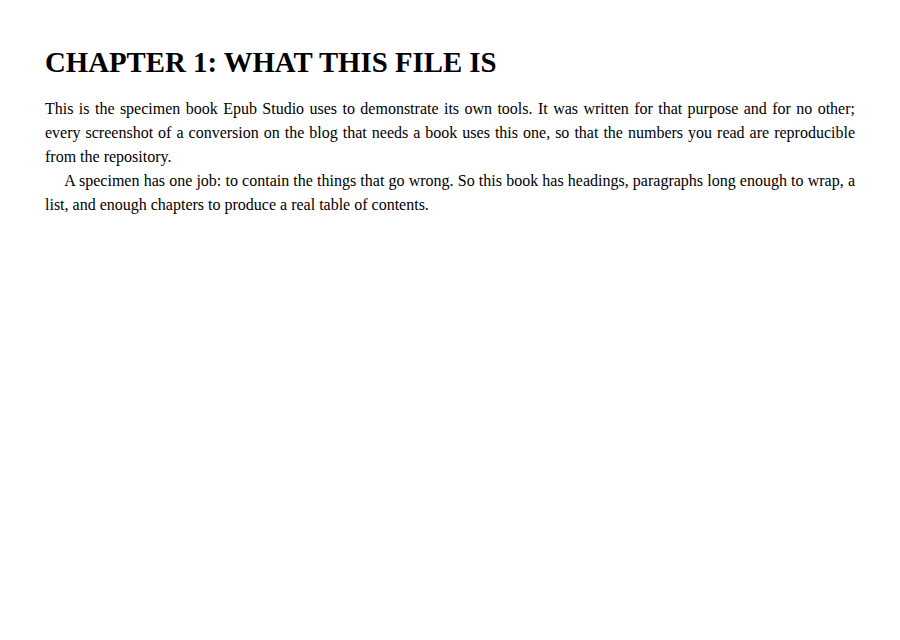
That is chapter-002.xhtml from the extraction, rendered by Chromium straight off the disk — justified text, first-line indents, the lot, because the chapter links style.css by relative path and the stylesheet extracted right next to it.
There is even a ready-made index page. The navigation document, nav.xhtml, is an ordinary list of links:
<ol>
  <li><a href="chapter-001.xhtml">THE CONVERSION SPECIMEN</a></li>
  <li><a href="chapter-002.xhtml">CHAPTER 1: WHAT THIS FILE IS</a></li>
  ...
</ol>
Open that one file and you can click through the whole book in a browser tab. For a book you mean to put on the web, nav.xhtml is your homepage, already written.
The strict-parsing catch
The extension matters more than it looks. A .xhtml file is parsed as XML, and XML parsing has no mercy. We removed a single closing </h1> from that chapter and reopened it:
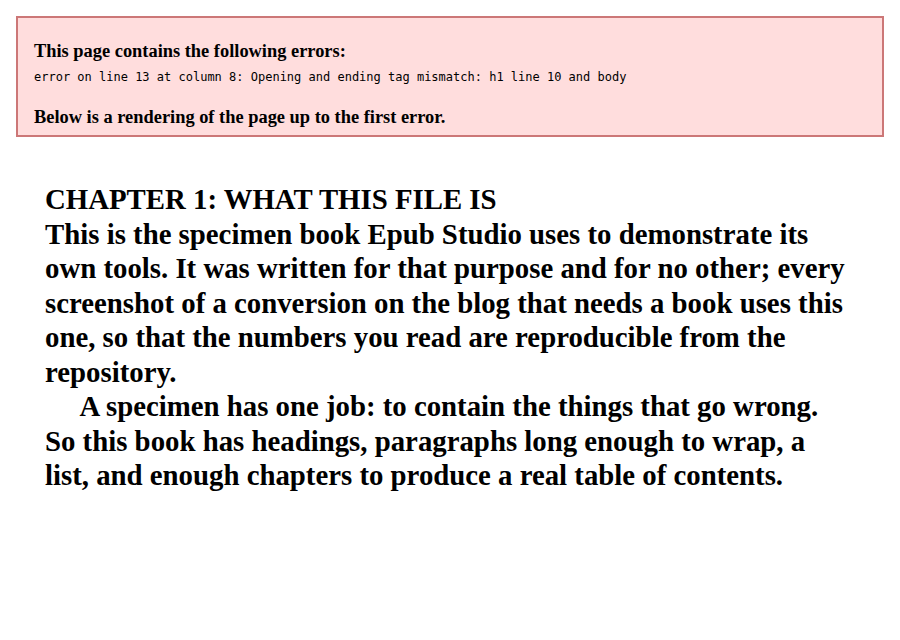
One missing tag, and the browser reports the line and column rather than guessing. This strictness is why a book can render in one reader and break in another, and it cuts both ways here. Reading extracted chapters, you will never notice it — a book that opened in your reader is well-formed. Hand-editing them, you will meet it immediately. The escape hatch is the rename in the other direction: change .xhtml to .html and the browser switches to its lenient HTML parser, which recovers from almost anything. The markup inside needs no change at all.
Keep the folder together
Everything in an extracted book points sideways. The chapter found its stylesheet through href="style.css"; in our comic test book each page is just <img src="page-0001.png"/>, resolved from the same folder. Relative references are what make the extraction portable — copy the content folder anywhere, upload it to any web host, and the links keep working — and also what makes a single chapter mailed to someone arrive naked, stripped of styling and pictures. Move the folder, never the file.
The one thing the folder cannot give you is a single-file book. EPUB stores one document per chapter, so that is what extraction yields; stitching them into one page means pasting the chapter bodies together in the order nav.xhtml lists. For five chapters that is ten minutes. For fifty, it is a sign you wanted a different output format all along.
If HTML was never really the goal
Extraction hands you the book’s real markup, which is exactly right for some jobs and beside the point for others. Being realistic about which is which:
| You actually want | The better route |
|---|---|
| The book’s text, no markup at all | The EPUB to TXT converter — our test book’s 5,183 bytes came out as a 1,582-byte plain-text file in this session, headings and paragraphs intact |
| One editable document | The EPUB to DOCX converter — chapters become headings in a single file |
| Web pages to publish or archive | Extraction, exactly as above |
| An EPUB again, after editing the HTML | The HTML to EPUB converter — building fresh beats re-zipping, which trips the mimetype rule |
And one honest boundary: none of this touches a book with DRM. An encrypted book extracts into encrypted pieces, and that is the end of the road — a limitation of the lock, not of the method.
For everything else, the file on your disk is already the archive of web pages you were about to search for a converter to produce. Rename it and look.
How to convert an EPUB to HTML
- 01 Copy the book and rename the copy to .zipWork on a copy so the original stays readable. Changing the extension changes nothing inside the file — an EPUB is a ZIP archive already.
- 02 Extract the archiveEvery desktop unzips a .zip with its built-in archive tool. You get a small folder tree instead of a single file.
- 03 Open the content folderThe chapters usually sit one level down — OEBPS in our test book — as .xhtml files next to the stylesheet and any images.
- 04 Open a chapter in your browserDouble-click any .xhtml file. The browser renders it with the book's own stylesheet, because the markup was web markup all along.
Frequently asked questions
Can I turn an EPUB into a single HTML file?
Not by extraction alone — you get one file per chapter, which is how the format stores a book. To make one page, paste the body of each chapter into a single file in the order the contents page lists them. If what you actually want is one continuous document rather than web files, converting to DOCX is usually the shorter route.
Can I rename the extracted .xhtml files to .html?
Yes. The markup inside does not change, but the browser's parsing mode does: a .xhtml file is parsed as strict XML, where one mismatched tag stops the page, while a .html file is parsed leniently. If you plan to hand-edit the files, renaming them buys you the browser's forgiveness.
Will the extracted files work if I upload them to a website?
Yes, as long as the folder travels together. Chapters reference the stylesheet and images by relative paths — href="style.css", src="page-0001.png" — so a chapter separated from its folder loses its styling and pictures. Upload the content folder as it extracted and the references keep working.
Does this work on a book with DRM?
No. A book with store DRM keeps its chapter files encrypted inside the archive, so what you extract is not readable markup. That is a property of the DRM itself, and turning it off is not something this trick — or any tool on this site — does.
Can I edit the extracted files and zip them back into an EPUB?
Not with an ordinary zip tool — an EPUB requires its mimetype entry to be the archive's first file, stored uncompressed, and a standard archiver breaks that rule, producing a book many readers reject. If you have edited the chapters, the safer route is to build a fresh book from the HTML files rather than re-zip the old one.