Weird characters in an EPUB: what ’ really means

“The book converted fine, but every apostrophe is now ’.” The complaint keeps resurfacing on Adobe’s user forums and in GitHub issue trackers, usually followed by advice to reinstall something. Sometimes the weird characters in the EPUB are that three-symbol cluster; sometimes they are black diamonds with question marks inside; sometimes an é has become é. Reinstalling never helps, because nothing is broken in the app.
What you are looking at is one paragraph of text being read with two different alphabets. That sounds abstract, so this post does it for real — one test file pushed through both failure directions this session, with the garbage measured byte by byte. The good news: the garbage is not random. It is a code, it names the culprit, and one of the two directions is completely fixable.
One text, two alphabets
A text file is just bytes, and bytes only become letters through an agreed table. For plain English the tables all agree: a is byte 61 everywhere, which is why ASCII text never garbles. The trouble starts with everything a typewriter didn’t have — curly quotes, em-dashes, accents.
UTF-8, today’s standard, spends two or three bytes on such characters. The curly apostrophe ’ is the three bytes e2 80 99. The older one-byte-per-character tables — Windows-1252 and its Latin-1 relatives — instead give each of those byte values its own symbol: e2 is â, 80 is €, 99 is ™.
Read the UTF-8 apostrophe with the old table and you get all three: ’. That is the whole mechanism. Nothing was deleted or corrupted — the same bytes are on disk either way — one program simply wrote modern bytes and another read them as if it were 1998. We rendered our test sentence’s actual UTF-8 bytes under a Windows-1252 declaration to show it happening:
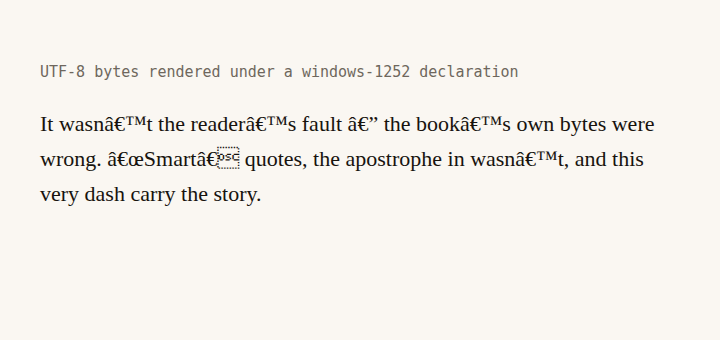
This is not a hypothetical failure. A documentation site hit exactly this when a plugin dropped the charset declaration from its pages — apostrophes site-wide turned into ’ until the tag was restored. When nothing declares the encoding, every consumer has to guess, and guesses differ; a declaration makes guessing unnecessary, which is why losing one is enough to break a book in some apps and not others.
Read the weird characters: they name the culprit
Because the byte maths is fixed, each piece of garbage decodes to exactly one original character. We computed this table from the real byte values, not from memory:
| You see | It was | The bytes |
|---|---|---|
’ | ’ right single quote / apostrophe | e2 80 99 |
“ | “ left double quote | e2 80 9c |
— | — em-dash | e2 80 94 |
… | … ellipsis | e2 80 a6 |
é | é e-acute | c3 a9 |
� | unknowable — see below | invalid as UTF-8 |
One asymmetry is worth noticing: the closing double quote ” ends in byte 9d, which has no symbol at all in Windows-1252. That is why a mangled book often shows “ where a quotation opens but an empty box or nothing where it closes — the same paragraph, visibly half-translated. You can see that box in the render above, right after “Smart”.
The last row is the other direction entirely. Legacy encodings pack ’ into the single byte 92, and 92 in the middle of plain text is not valid UTF-8. A UTF-8 decoder that hits it cannot recover the intent, so it substitutes the official replacement character: �. The original byte is discarded in the process — which is why this direction, unlike the first, destroys information.
The fix runs through the source, not the output
Knowing the direction, the repair is short. First, read the garbage against the table above: clusters mean the text is fine and merely mis-read; diamonds mean the copy in front of you has lost those characters and you need the file it was made from.
Second, go back to that source file — the TXT, the HTML, the exported manuscript — and re-save it as UTF-8. Any serious editor offers this in its save dialog; on a converted book, this one setting is usually the entire fix. We proved the stakes with a live run: the same 275-byte test file saved as UTF-8 went through our text to EPUB converter and came out a 2,793-byte book with every apostrophe, dash and accent intact, byte for byte.
Third, convert again from the clean source rather than patching the broken output. Find-and-replacing ’ in a damaged file works until you meet the half-translated cases like the vanished closing quote, which have nothing left to search for. A fresh conversion has none of these problems, and the output declares its encoding twice on every chapter — an XML declaration and a meta tag — so nothing downstream has to guess:
<?xml version="1.0" encoding="UTF-8"?>
...
<meta charset="utf-8"/>
That block is quoted from the file our converter actually produced this session, not from documentation. It is the declaration whose absence broke the documentation site linked above.
Fourth, spot-check the result: one apostrophe, one pair of quotes, one accented word. Those are the highest-frequency casualties, and if they survived, the plain text around them certainly did.
The direction nothing can fix
Now the honest part. We took the same test sentence, saved it as Windows-1252 — the way an older Windows tool or a legacy export still might — and dropped the 253-byte file on our own converter. It converted without complaint. Here is the chapter it produced, opened verbatim:
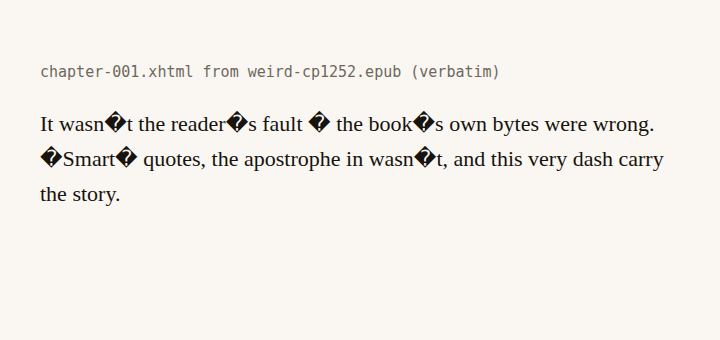
Every curly quote, both dashes and all six accents in the file — gone, each replaced by �. Our converter, like the browser machinery it runs on, decodes input text as UTF-8; handed a legacy file, it replaces what it cannot parse and keeps going. The damaged chapter file even came out six bytes bigger than the clean one — 629 bytes against 623 for identical prose — because a replacement character costs one byte more than each of the six accented letters it destroyed. That is a real limitation of our tool, and this is us telling you about it: it will not detect a legacy file for you.
Neither will validation. We ran the damaged book through our EPUB validator and it reported, in full: “No problems found. This EPUB is structurally valid.” — correctly, because validation checks the container and manifest, the things that make an EPUB an EPUB, and a replacement character is legal XML. A book can pass every structural check and still read like a ransom note; if it fails structurally too, that is a different repair entirely.
And if what you have is a finished EPUB already full of �, with no source file to return to: those characters are not coming back by conversion, ours or anyone’s. The bytes were discarded upstream. A human with context can restore them by hand — every wasn�t was obviously wasn't — and for a book-length job, a desktop editor like Calibre’s is the right place to do that patiently. We would rather say so than sell you a converter for it.
The cheap insurance, next time, costs one click: save the manuscript as UTF-8 before you convert it. Do that, and the text to EPUB converter will carry every last apostrophe through exactly as you typed it — ours ships the declaration on every chapter it writes, so the ’ class of failure has nothing to feed on.
How to fix weird characters in a converted ebook
- 01 Read the garbage to identify the directionThree-character clusters like ’ mean UTF-8 bytes were read as a legacy encoding. Black � diamonds mean the opposite: legacy bytes were read as UTF-8.
- 02 Go back to the source fileOpen the original TXT, HTML or manuscript in an editor that shows the encoding, and re-save it as UTF-8. Patching the broken output character by character is the slow way to miss some.
- 03 Convert again from the clean sourceRun the UTF-8 source through the converter once more. The new EPUB carries the text byte for byte and declares its encoding on every chapter.
- 04 Spot-check the punctuationOpen the new file and look at an apostrophe, a quotation mark and any accented word. If those four survive, the rest of the text did too.
Frequently asked questions
Why does my ebook show ’ instead of an apostrophe?
The apostrophe was stored as the three UTF-8 bytes E2 80 99, and something in the chain read those bytes with a one-byte-per-character legacy table instead. Under Windows-1252 those three bytes are â, € and ™ — which is exactly the cluster on your screen. The text itself is usually intact; it is being read with the wrong alphabet, so fixing the declaration or reconverting recovers it.
Why do I see black diamonds with question marks instead of letters?
That diamond is the Unicode replacement character, and it means the damage ran in the other direction: a file saved in a legacy encoding was decoded as UTF-8, the decoder hit byte sequences that are not valid UTF-8, and it substituted each one. Unlike the ’ case, the original character is gone from that copy — the fix is re-saving the source as UTF-8 and converting again, not editing the output.
Can the EPUB validator detect encoding problems?
No, and we tested ours to be sure. A book whose every quotation mark had been replaced came back "No problems found. This EPUB is structurally valid." — the validator checks the container, the manifest and the package document, and mangled punctuation is perfectly legal XML. A book can be structurally valid and unreadable at the same time.
Will converting the book again fix the weird characters?
Only if you convert from a clean source. Conversion carries text through faithfully — including faithfully carrying garbage, as our test showed when a legacy-encoded file came out with every special mark replaced. Re-save the original file as UTF-8 first, then convert; the converter then writes and declares UTF-8 on every chapter it produces.
What encoding should the text inside an EPUB use?
UTF-8, declared explicitly. Modern tooling has settled on it because it covers every script and stays byte-compatible with plain ASCII, and every consumer assumes it when the file says so. Each chapter our converters produce states the encoding twice — once in the XML declaration and once in a meta tag — precisely so that nothing downstream has to guess.