What is a CBR file? Comic book archives explained

A downloaded comic arrives as issue-01.cbr, your computer offers nothing to open it with, and the search begins. So: what is a CBR file? It is not an exotic format, and it is not really a comic format at all. It is a plain, ordinary archive — the same kind of file as a .rar — holding one image per comic page, renamed so that comic reader apps recognise it and open it straight into reading mode.
That is the entire trick, and it explains its sibling too: CBZ is the identical idea built on a ZIP archive instead of a RAR one. The final letter names the compressor — R for RAR, Z for ZIP. Rarer siblings exist on the same pattern (.cb7 for 7-Zip archives), but CBR and CBZ cover almost everything you will actually meet.
An archive of pages, renamed
Here is a real one. This site’s repository keeps a small two-page CBZ we use for testing, built with our own tools. Listing its contents with an ordinary unzip utility shows everything the format is:
Archive:  comic-2page.cbz
  Length      Date    Time    Name
---------  ---------- -----   ----
    56542  2026-08-05 14:16   page-001.png
    47365  2026-08-05 14:16   page-002.png
---------                     -------
   103907                     2 files
Two PNG images. Nothing else — no index file, no manifest, no settings. Reading order is simply filename order, which is why well-made comic archives number their pages with padded zeros: an app sorting naively would put page10 after page1 but before page2, so careful naming (or a reader that sorts numerically) is what keeps the story in sequence.
If that “it’s secretly a zip” move sounds familiar, it should — an EPUB is also a ZIP archive underneath. The difference is discipline. EPUB specifies a manifest, a reading order, metadata and navigation inside its zip; a comic archive specifies nothing. It is the minimum viable ebook: pictures, in a bag, in order.
CBR vs CBZ — the one letter that matters
The two formats are interchangeable for the reader and very much not interchangeable for software. The compressor is the whole difference:
| CBZ | CBR | |
|---|---|---|
| Archive type underneath | ZIP | RAR |
| Openly documented | Yes — ZIP tooling is everywhere | No — RAR is a proprietary format |
| Open without special software | Rename to .zip, double-click | Needs an app or utility that speaks RAR |
| Can browser tools unpack it | Yes | Generally not |
| Compression benefit for comics | Negligible — the images are already compressed | Same — negligible |
Note that last row: JPEG and PNG pages are already compressed, so the archive step saves close to nothing regardless of which compressor made it. Our two-page specimen is 103,907 bytes of images and 104,129 bytes as a CBZ — the wrapper costs more than it saves. Nobody chooses CBR for compression; files end up in one format or the other because of whatever tool packed them years ago.
The practical consequence runs one way. ZIP being open and universal is why our converters accept CBZ but not CBR — the code that unpacks RAR carries licence restrictions that make it a poor fit for tools that run entirely in your browser. If you have a CBR, extract the images with an archive utility that handles RAR, repack them as a normal zip, rename it .cbz, and every route below opens up. Not elegant, but it works, and it is a one-time fix per file.
How to open one
For reading, any dedicated comic reader on any platform opens both formats — that is the entire reason the extensions exist, so these apps can claim the file type. A CBZ additionally has the zero-install route: rename, unzip, look at pictures.
For converting into something more portable, this is what our tools do. Our CBZ to EPUB converter turns the archive into a proper ebook — each image becomes a page, pages are sorted numerically so page2 lands before page10, and the first page is registered as the cover. It accepts a bare .zip directly too. Here is a real run on the two-page specimen from earlier:
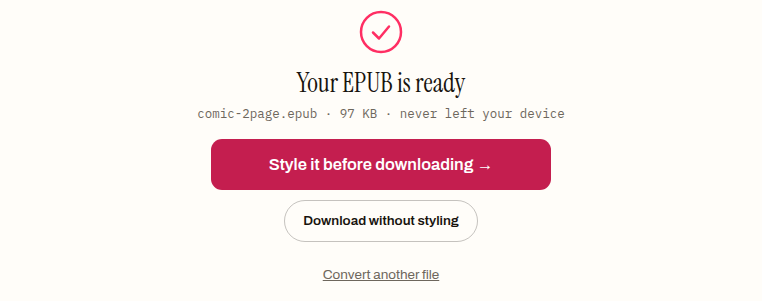
That run took 104,129 bytes of CBZ in and produced a 99,802-byte EPUB — essentially the same size, because the pages are the same images in a smarter wrapper. The conversion happens in your browser; the file never uploads anywhere.
Whether you want EPUB or PDF depends on the destination. E-reader apps and ebook libraries want EPUB. For printing, or for reading on anything that treats PDFs well, a fixed page format suits comics better than it suits novels — a comic page is a fixed image anyway, so the usual reflow argument for EPUB barely applies here.
What the format cannot do
Honesty about the ceiling. A comic archive has no text layer, so nothing in a CBR or CBZ can be searched, selected or read aloud — the words are pixels. There is no standard metadata, so your library app is guessing title and author from the filename. And conversion cannot add quality that the scans do not have: a low-resolution CBR becomes a low-resolution EPUB, pixel for pixel.
One more edge worth naming: if a CBZ refuses to open anywhere, it is very often a CBR that someone renamed by hand — changing the extension does not change the archive inside. An archive utility will tell you the truth in one glance where a comic reader just shrugs.
The fastest way to understand these files, though, is to run one through a converter and look at what comes out. Drop a .cbz into the CBZ to EPUB converter and you get back a real book your reading app understands, cover and all, without the file leaving your machine.
Frequently asked questions
How do I convert a CBR file to CBZ?
Extract the images with an archive utility that handles RAR, repack them as an ordinary ZIP, and rename the result to .cbz. Not elegant, but it is a one-time fix per file — and because CBZ is built on the openly documented ZIP format, it opens up browser-based tools that cannot legally ship RAR-unpacking code.
Why won't my CBZ file open in any reader?
Very often it is actually a CBR that someone renamed by hand — changing the extension does not change the archive inside, and a ZIP-expecting app cannot unpack a RAR. An archive utility will tell you the real format in one glance where a comic reader just shrugs.
Can I search or copy text from a CBR or CBZ comic?
No. The formats have no text layer — the words are pixels inside the page images — so nothing can be searched, selected or read aloud. There is no standard metadata either, which is why library apps end up guessing title and author from the filename.
Does converting a CBZ to EPUB make the file smaller?
No — expect roughly the same size. The pages are already-compressed JPEG or PNG images, so repacking saves almost nothing; our two-page test archive of 104,129 bytes came out as a 99,802-byte EPUB. What changes is the wrapper: the EPUB adds a manifest, a reading order and a registered cover.
Should I convert a comic archive to EPUB or to PDF?
Pick by destination. E-reader apps and ebook libraries want EPUB; for printing, or for anything that treats PDFs well, a fixed page format suits comics fine, because a comic page is a fixed image anyway and EPUB's usual reflow advantage barely applies.
Why do comic pages sometimes display out of order?
Reading order in a comic archive is simply filename order. If pages are numbered without padded zeros, an app sorting naively puts page10 after page1 but before page2 — careful zero-padded naming, or a reader that sorts numerically, is what keeps the story in sequence.