EPUB downloaded as a ZIP? Look inside before you rename

You clicked download on an ebook and what landed in the folder ends in .zip. This EPUB-downloaded-as-a-ZIP confusion turns up steadily — on the Windows Central forums, in Adobe’s Digital Editions community, in Google Drive help threads — and the standing answers run from “just rename it” to instructions for editing a web server’s configuration file, which is no use at all when the server is somebody else’s.
Here is the part rarely said plainly: most of the time nothing went wrong. The file that arrived is very likely your book, complete and intact, wearing a label that makes your computer treat it as an archive instead of handing it to a reading app. But most of the time is doing real work in that sentence. Renaming blindly is how a perfectly good download gets declared broken — and how a genuinely mispacked one wastes an evening.
mimetype file and a META-INF folder, rename a copy to .epub and you have your book. If it holds anything else — pictures, web pages, one wrapping folder — renaming won't help, but each of those has its own way out.
Why an EPUB downloads as a ZIP at all
EPUB does not have its own container format. It borrows ZIP and adds rules on top: a mimetype entry holding application/epub+zip, stored first in the archive, plus a META-INF/container.xml that points at the book’s package document. Every EPUB ever made opens in an ordinary archive tool, because the structure of an EPUB genuinely is a zip of small text files and images.
The extension is not part of the file. It is a hint to the operating system about which program to hand the file to — and the hint can go wrong anywhere between the shelf and your disk. A server that announces the download as a generic archive rather than an ebook, or a download path that names the file from that announcement, and the same bytes arrive labelled .zip. Nothing inside changes. On our five-chapter specimen book, the proof takes one command: the first two bytes are PK, the ZIP signature, and the string application/epub+zip sits at byte 38 — whether the file is called specimen.epub or specimen.zip.
Open it and read the top level before renaming
The rename is the right fix for exactly one of four situations, and thirty seconds of looking tells you which one you have. Double-click the zip — every desktop opens one — and read what sits at the top level:
| What the top level holds | What it really is | The way out |
|---|---|---|
mimetype + META-INF/ + a content folder | An EPUB wearing the wrong label | Rename a copy to .epub |
A run of .png or .jpg page images | A comic or scan sequence | Drop it on CBZ to EPUB as-is |
.html files and stylesheets, no META-INF | Saved web pages, not a book | Build one with HTML to EPUB |
| One lone folder with everything inside it | A book packed one level too deep | See below — renaming fails |
And one non-member of the family: a tiny download ending .acsm is not a mislabelled book at all. It is a licence file that Adobe Digital Editions exchanges for the actual book, and no rename changes that.
The rename, proven on a real book
To stand in for the mislabelled download, we renamed our specimen book — 5,183 bytes, five chapters — to specimen.zip and treated it as an arriving file. Unzipping the “archive” lists a complete book, thirteen entries in all:
$ unzip -l specimen.zip
      20  mimetype
     251  META-INF/container.xml
     452  OEBPS/style.css
     364  OEBPS/chapter-001.xhtml
     ...
    1314  OEBPS/content.opf
cmp confirms the renamed file is byte-for-byte identical to the original EPUB — the extension carried no information the contents miss. Renamed back to .epub and dropped on our validator, it passes without a murmur:
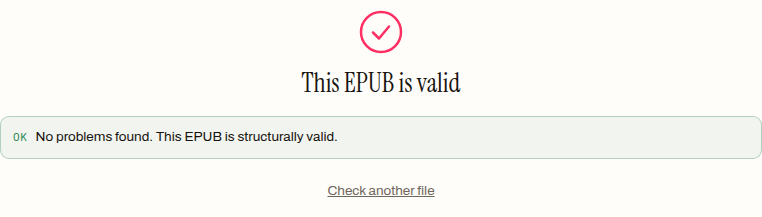
Two habits make this safe rather than hopeful. Work on a copy, so the file as it arrived is always still there. And validate the result instead of assuming — the validator is also what catches the cases below, where the rename was never going to work.
A zip of page images is already nearly a comic
If the archive turns out to hold pictures instead of a book, you are closer to done than it looks. A CBZ comic archive is a zip of images with a different extension — the same trick in the other direction — and our comic converter’s accept list includes plain .zip for exactly this reason.
We built one from real files to check the whole route: two scanned pages, 56,542 and 47,365 bytes of PNG, zipped into a 96,845-byte scans.zip and dropped on the converter without any renaming:
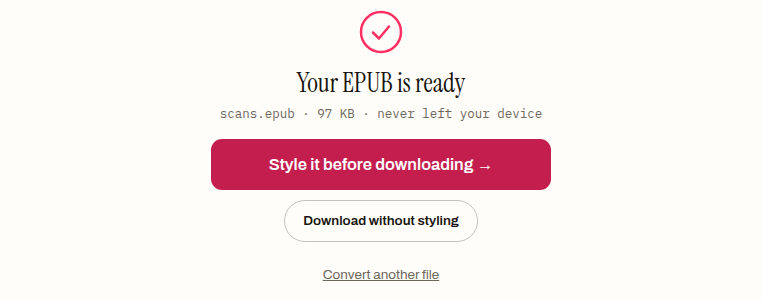
The result is a 99,793-byte EPUB: each image wrapped in its own one-page chapter, a navigation file, and both scans carried over byte-identical. The conversion runs in the browser, so the pages never leave your machine.
The zips a rename cannot save
Being realistic about the failures matters more than celebrating the easy case. Two archives will defeat the rename, and they announce themselves clearly.
The book packed one level too deep. Zip up a book folder — rather than the folder’s contents — and every required file ends up nested where no reader looks. We packed our specimen that way deliberately (6,379 bytes, everything under one winter-hollow/ directory), renamed it to .epub, and asked the validator:
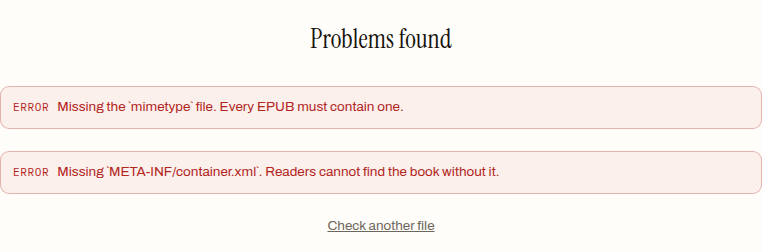
The files are all present; they are just not at the top level, so the format’s landmarks are missing where they must be. The tempting fix — extract everything and zip it again from inside the folder — trips a subtler rule: EPUB requires mimetype first in the archive and uncompressed, and general-purpose zip tools do not honour that. The re-zip trap has its own post; the short version is that repacking belongs to tools that understand the container.
The zip that is not a book at all. PDFs, a publisher’s press kit, chapter drafts — a rename never changes what a file is, only who is asked to open it. If the top level matches none of the rows in the table, there is no EPUB here to recover.
Whichever case you land in, the two-minute check is the same: look inside, then confirm the result with the validator rather than bouncing the file off reader after reader. A green report means the label was the only thing wrong — and the label, at least, is the one part of an ebook anyone can fix.
How to turn a ZIP download back into an EPUB
- 01 Open the .zip and read its top levelDouble-clicking opens it in any archive tool. A file called mimetype sitting next to a META-INF folder means the archive already is an EPUB.
- 02 Copy the file and rename the copy to .epubKeep the original as it arrived. Changing the extension rewrites nothing inside — the renamed copy stays byte-identical.
- 03 Run the renamed file through a validatorA sound book reports no problems. Errors about a missing mimetype or META-INF/container.xml mean the archive was packed wrong, not mislabelled.
Frequently asked questions
Why did my ebook download as a .zip file instead of .epub?
Because EPUB is built on the ZIP container, and somewhere between the server and your disk the file was labelled as a generic archive rather than as an ebook. The contents are unaffected — the extension decides which program opens the file, not what is inside it. If the archive's top level holds a mimetype file and a META-INF folder, the book arrived intact.
Is it safe to rename a downloaded .zip to .epub?
Renaming changes only the label, never the contents — in the test run for this post the renamed file compared byte-for-byte identical to the original. Do it on a copy so you keep the file exactly as it arrived, and run the result through a validator to confirm what you have. If the rename does not produce a working book, the zip held something other than an EPUB to begin with.
Can I turn a ZIP full of images into an EPUB?
Yes, and without renaming anything. A zip of page images is structurally the same thing as a CBZ comic archive, and the comic converter accepts a plain .zip as-is. The 96,845-byte test zip of two scanned pages in this post became a 99,793-byte EPUB with one page per chapter, converted entirely in the browser.
I renamed the zip to .epub and it still will not open. Why?
Almost always because the book is not at the archive's top level. The commonest case is a single folder wrapping everything — a reader then finds no mimetype and no META-INF where the format requires them, which is exactly what a validator reports. Open the archive and look: if the top level is one lone folder, the book was packed one level too deep.