EPUB links not working? Find the layer that broke them

The book reads fine until you tap a link. “See the map in chapter two” — nothing happens, or the app throws you somewhere strange, or the tap works in one reader and dies in another. EPUB links not working is one of the longest-running complaints in ebook forums: MobileRead has threads on internal links breaking after conversion and on hyperlinks vanishing en route to PDF, the Calibre bug tracker has its own entries, and the same story repeats on the Pressbooks forum and in Adobe’s InDesign community whenever an export or an import shuffles files around.
The reason the complaint never dies is that “the links are broken” describes three different faults with one sentence. We built a small book carrying one of every kind of link, then ran it through our own live tools to watch exactly where each kind survives and where it dies.
#fragment, or a URL. It breaks when the file half stops
matching a real file (renames during conversion, merge or import), when the
fragment half stops matching a real id, or when the output format
has no live links at all. Nothing warns you, because container-level
validation never reads the hrefs in your prose.
A link is only a string
Open any EPUB (it is a ZIP — rename and extract) and look at a chapter file. Every link is an ordinary XHTML anchor, and there are only three shapes:
- Same-file:
href="#recap"— jumps to anidin the same chapter file. - Cross-file:
href="chapter-3.xhtml#verdict"— names another file in the archive, then anidinside it. - External:
href="https://example.org/"— leaves the book entirely.
Each shape has its own failure condition. A same-file link needs its id to
exist. A cross-file link needs the exact filename and the id. An
external link needs a reading system willing to open it. The
EPUB 3.3 specification
treats these differently too: every content document a book links to
internally must be listed in the manifest and spine — the requirement applies
recursively — while links to resources outside the container are explicitly
not publication resources. The spec polices the packaging. It does not, and
cannot, police whether the string in your prose still names anything real.
(Footnote references are this same machinery with semantics on top — the
footnote pop-up mechanics are their own story.)
Our test book, linkbook.epub, is 2,731 bytes: three chapters carrying one
link of each shape, plus a fourth on purpose — href="notes.xhtml#n1", where
notes.xhtml does not exist anywhere in the archive.
Where the validator’s sight ends
We dropped the book, dead link and all, onto our live EPUB validator:
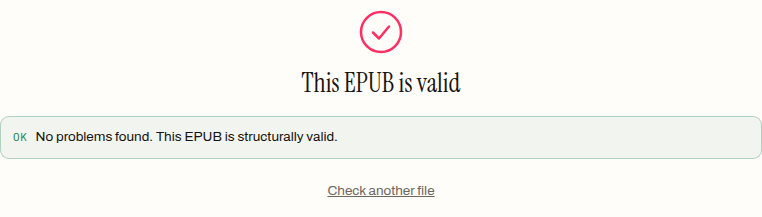
“No problems found. This EPUB is structurally valid.” Then we made one change:
a second copy, 2,743 bytes, identical except the missing notes.xhtml is now
declared in the manifest:
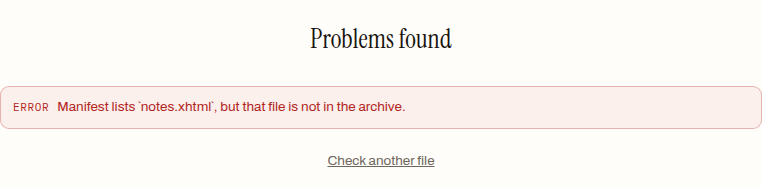
That pair of runs draws the boundary exactly. Container-level validation — ours included; the code checks every manifest href against the archive but never parses the chapter XHTML — verifies that the box keeps its promises. The hrefs inside your prose are content, not packaging, and no container check follows them. A clean validation report and a book full of dead links are entirely compatible, which is why so many forum threads open with “but the file validates fine”.
A merge that breaks links on purpose
Renaming is the classic killer, and you do not need a broken tool to see it —
a working one will do. We merged linkbook.epub with a 2,103-byte second book
through our live merge tool, then unzipped the 5,442-byte
result and read every href. The merge rebuilds the combined book cleanly, and
that rebuild renames every chapter to chapter-001.xhtml through
chapter-007.xhtml. The link strings inside the text ride along verbatim:
| Link in the source books | href string | After the merge |
|---|---|---|
| Same-file jump | #recap | Works — link and target id moved together into chapter-002.xhtml |
| Cross-file jump | chapter-3.xhtml#verdict | Dead — no file of that name exists; the target now lives in chapter-004.xhtml |
| Cross-file jump, book two | part-2.xhtml#end | Dead — its target is now chapter-007.xhtml |
| External | https://example.org/ | Untouched |
Two details from the audit are worth more than the headline. First, the
regenerated table of contents works — the merge writes a fresh nav.xhtml
against the new filenames, so navigation survives while in-text
cross-references die. If your TOC is fine but “see chapter two” is dead,
something renamed your files. Second, the merged book — three dead links
inside — passes the live validator clean, because none of those stale
strings appear in the manifest. This is the identical mechanism behind the
Pressbooks import threads and a fair share of the Calibre ones: not a bug in
any one converter, just filenames changing while href strings do not.
PDF keeps the words and drops the wiring
The other recurring thread — hyperlinks lost on the way to PDF — reproduces
just as cleanly. We converted linkbook.epub through our live
EPUB to PDF converter: 2,731 bytes in, a 4,382-byte
three-page PDF out. Then we decompressed all three content streams and
searched them. Every link phrase is present — “example.org”, “the verdict
in chapter three”, “see the notes”. And the file contains zero link
annotations: no /Annots, no /URI, no /Link objects anywhere.
That is the whole explanation. In a PDF, a clickable region is an annotation object written onto the page, separate from the text it covers. A converter that lays out the words but writes no annotations produces exactly what the forum threads describe: a book that reads perfectly and taps like paper. The link was not mangled — it was never wired up in the new format. Ours behaves this way, and we would rather show you that than have you discover it after shipping a PDF to readers.
What this cannot promise
Being realistic about the boundaries of everything above:
- No automatic repair exists here. Our editors change metadata and covers; nothing on this site rewrites hrefs inside chapter prose. Fixing a dead link means opening the XHTML and correcting the string — Sigil-class source editing, done by hand, then re-validating.
- Reader behaviour is its own layer we did not test. Forum threads regularly blame devices for refusing external links even when the markup is sound. We have no e-ink hardware in this test rig, so this post makes no claims about what any specific device or app does with a well-formed link — only about what is verifiably in the file.
- Merging is a trade, not a fault. Combining books into one archive cannot both rename files and leave hrefs pointing at the old names. If your books cross-reference each other’s chapters, expect to re-link by hand afterwards; the merged TOC will carry you until then.
The diagnosis, at least, costs nothing. Unzip the book, read the failing href, and check its two halves against the archive — that identifies the broken layer in a minute or two. And before and after any repair, run the file through the EPUB validator: it will not follow your prose links, but it catches the packaging breaks — the promised-but-missing files — that turn a mystery into an error message with a filename in it.
How to find which layer broke a link
- 01 Unzip the book and read the hrefCopy the EPUB, rename the copy to .zip, extract it, and open the chapter file that holds the failing link. The href attribute is the link, verbatim — everything else is diagnosis of that one string.
- 02 Check the file halfTake the part of the href before any # and look for that exact filename in the extracted folder. If it is not there, the target was renamed or dropped, and the link died at layer one.
- 03 Check the fragment halfOpen the target file and search for id="…" matching the part after the #. No match means the anchor was lost — usually by a converter that rebuilt the HTML.
- 04 Validate the containerRun the book through an EPUB validator to catch the packaging-level breaks — files the manifest promises but the archive does not contain. Expect a clean pass to mean the container is sound, not that every href resolves.
Frequently asked questions
Why does my EPUB validate clean when half its links are dead?
Because container-level validation reads the packaging — mimetype, container.xml, the manifest, the spine — and never follows the hrefs inside your prose. We built a book with a link to a file that does not exist and it passed a live validation with no problems found. The same missing file declared in the manifest fails instantly. A clean pass means the box is sound, not that the wiring inside it works.
Are the table-of-contents links broken too after a merge?
Usually not, and our test showed why: the merge rebuilds the navigation document from scratch against the new filenames, so every TOC entry pointed at a file that exists. Only the links written inside the chapter text keep their old strings. That split — regenerated navigation working, in-text cross-references dead — is a strong clue that files were renamed.
Do links survive converting an EPUB to PDF?
In our converter the words survive and the click does not. The 2,731-byte test book became a 4,382-byte, 3-page PDF whose text still contained every link phrase, but the file carried zero link annotations — in a PDF, a clickable link is a separate annotation object that has to be written onto the page, and this converter does not write them. The sentence reads fine; tapping it does nothing.
Can a tool repair broken internal links automatically?
None of the tools on this site do. The hrefs live inside the chapter XHTML, and our editors deliberately touch metadata and covers, not prose. Repair means opening the chapter files and correcting each href string to the current filename and id — source-level editing, the kind of job a code-view editor like Sigil exists for.
Why did the links break when I imported the book into another platform?
Almost always the same mechanism our merge demonstrated: the platform stores chapters under its own filenames, but the hrefs inside the text are plain strings that still name the old files. Nothing rewrites them, so every cross-file reference points at a ghost. Same-file anchors tend to survive because the link and its target move together.